
Enterprise Recon 2.0.31
Notifications and Alerts
Set up event notifications for system events by going to MONITORING AND ALERTS > NOTIFICATIONS AND ALERTS.
This section covers the following topics:
Set up Notifications and Alerts
To set up notifications and alerts:
-
Expand the navigation menu, ENTERPRISE RECON
 .
. - Go to MONITORING AND ALERTS > NOTIFICATIONS AND ALERTS.
- On the top-right of the page, click + Create a Notification.
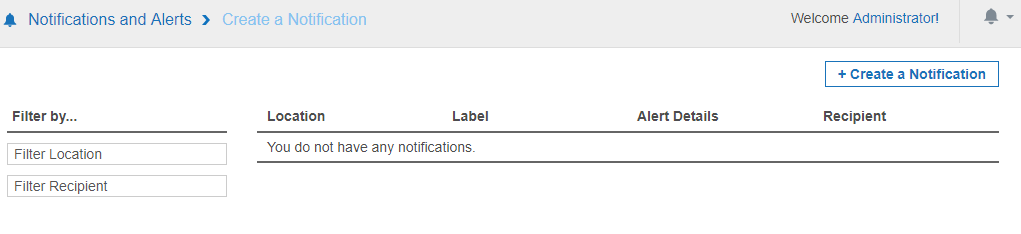
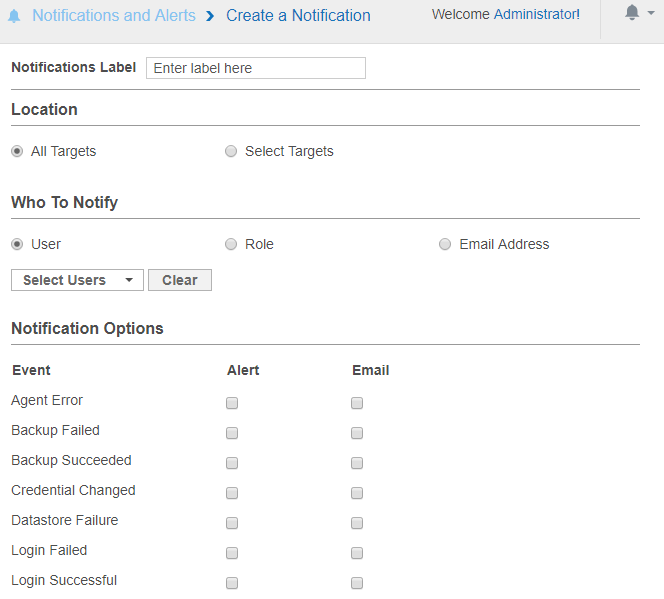
- In Notification Label, enter a label for this set of notifications.
-
In Location, select the targets you want to set up notifications for.
Global Admins can select All Targets to set up a global notification for all Targets. - In the Who To Notify section, select users to send notifications to:
- User: Send an alert or email to selected users.
- Role: Send an alert or email to all users belonging to selected roles. See User Roles.
- Email Address: Send an email to a specific email address.
- In the Notification Options section, select the type of notification a user receives:
- Alert
Notifications
Notifications can be sent to users as:
Alerts
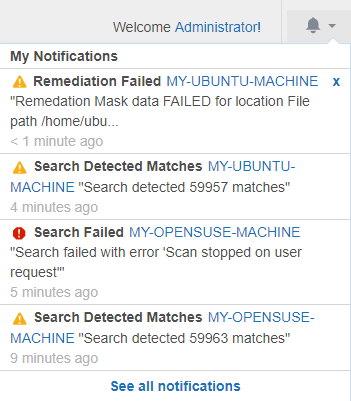
Alerts sent to users are displayed under the notifications icon  .
.
 .
.
Users can view a summary of alerts sent to them on the My Account Details page. To view a summary of alerts:
- Click the notifications icon .
- Click See all notifications.
Or:
- Go to MY ACCOUNT > MY ACCOUNT DETAILS.
- Click See My Notifications.
 .
.
Notification alerts are clickable only for the following events: Search Detected Matches, Search Failed, Search Stalled and Remediation Failed.
Emails
Selecting Email under Notification Options has ER2 send email notifications to specified email addresses. The email address does not have to be registered to a user in ER2.
A Message Transfer Agent (MTA) must be set up for email notifications to work. See Mail Settings.
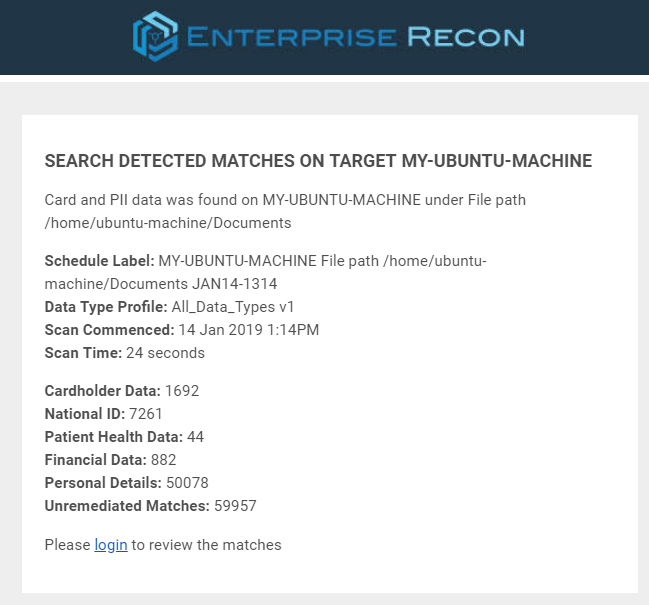
Notification emails contain clickable links only for the following events: Search Detected Matches, Search Failed, Search Stalled and Remediation Failed.
Events
You can configure ER2 to send a notification or an email alert for the following events:
| Event | Global Admin | Non-Global Admin |
|---|---|---|
| Agent Error | ✓ | |
| Backup Failed* | ✓ | |
| Backup Succeeded* | ✓ | |
| Credential Changed | ✓ | |
| Datastore Failure | ✓ | |
| Login Failed | ✓ | |
| Login Successful | ✓ | |
| No Matches Found | ✓ | |
| Process Failed | ✓ | |
| Remediation Canceled | ✓ | |
| Remediation Completed | ✓ | |
| Remediation Failed | ✓ | |
| Role Changed | ✓ | |
| Scan Running | ✓ | ✓ |
| Search Detected Matches | ✓ | ✓ |
| Search Failed | ✓ | ✓ |
| Search Stalled | ✓ | ✓ |
| Search Started | ✓ | ✓ |
| Target Not Scanned | ✓ | ✓ |
| User Account Changed | ✓ |
*ER 2.0.21 and above.